What’s Your Accessibility Risk?
When did you last review your organization’s accessibility risk? As disability rights legislation shifts around the globe, potential risk factors increase. This article identifies methods, processes, and quick wins to reduce organizational liability.
Every so often, we receive urgent requests to improve an organization’s web accessibility. Unfortunately, they often don’t realize they have neglected web accessibility issues until they receive a letter threatening legal action.
By failing to prioritize accessibility, they don’t just neglect a technical requirement. They create barriers that can exclude up to 15-20% of the global population.
This exclusion carries consequences that extend beyond social responsibility. A mounting pile of legal, financial, and operational risks pose very real threats that organizations across sectors should take seriously.
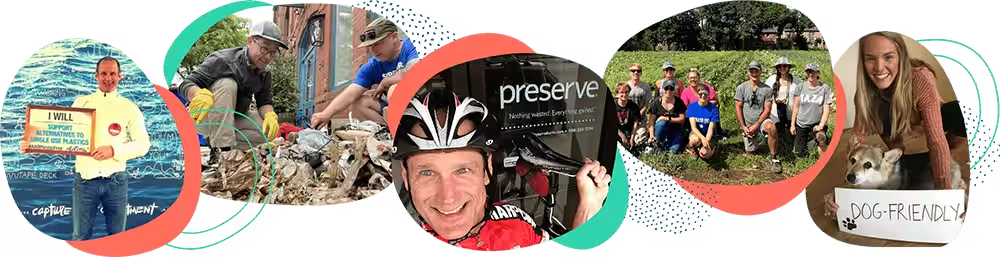
Massachusetts-based consumer packaged goods company Preserve recently found this out the hard way. Twice.
The lawsuits were a complete surprise to us. We have always prided ourselves on being an inclusive company, but didn’t realize how easily web accessibility tasks could slip through the cracks during the day-to-day schedule of running our business.”
— Eric Hudson, Founder, Preserve
Double Legal Trouble
In early 2026, Preserve received two separate legal threats claiming their website didn’t work for people with disabilities and, therefore, was in violation of the Americans with Disabilities Act. Over the course of about seven weeks, Mightybytes worked with Preserve’s team to address primary web accessibility risks and help them implement strategies to prevent future legal issues.
In addition to mitigating immediate legal threats, our aim was to set the company up for long-term success:
- Manual testing: First, we wanted to help them understand the value of manual over automated accessibility testing as a means to more effectively reduce risk (more on this below).
- Continuous improvement: We also wanted to help Preserve make an ongoing commitment to continuous improvement so web accessibility issues wouldn’t fall through the cracks over time.
These items are now on Preserve’s roadmap and we look forward to helping them improve digital inclusion alongside the company’s already impressive B Corp commitments.
When we design products we consider accessibility, such as braille out-molded on the bottom of our everyday tableware plates. Having a website that wasn’t accessible was an embarrassment and a large miss for our brand, mission, and risk management.
— Eric Hudson, Founder, Preserve
Preserve Case Study
For all the details on how we helped Preserve navigate pending accessibility litigation, check out our case study on the project.
Accessibility Risks: A Shifting Regulatory Landscape
Organizations often treat digital accessibility as a niche concern relegated to development teams. However, recent changes to global legislation have moved the issue to the forefront of organizational risk.
Web accessibility especially has become more stringent, moving from voluntary guidelines to enforceable mandates in several important jurisdictions around the world.
European Accessibility Act
The European Accessibility Act (EAA) is a primary example. Having entered its enforcement phase in 2025, the EAA caused the international business community to reckon with its terrible track record on digital accessibility issues.
While a European directive, its reach is global, similar to the European Union’s (EU) GDPR legislation on privacy. Whether an organization is headquartered in Berlin or Boston, if they offer products or services within the EU, they must comply.
For U.S.-based organizations that operate internationally, ignoring accessibility is no longer a localized risk. To maintain access to one of the world’s largest economic blocs, compliance is a non-negotiable prerequisite.
Like software itself, accessibility is never truly finished. As technology, standards, and user expectations evolve, organizations must continuously evaluate and improve their digital experiences. Accessibility is an ongoing effort that delivers lasting benefits when embraced across teams.
— José Martinez, CPACC, Digital Accessibility Supervisor, Access Living

Access Living
Mightybytes partners with Chicago-based disability rights advocacy group Access Living for manual accessibility testing projects to help our clients reduce risk and improve practices. Learn more on our Partners page.
ADA Updates
Similarly, the United States is actually improving digital inclusion, despite recent Federal trends in the opposite direction. The Americans with Disabilities Act (ADA) is undergoing significant updates that specifically focus on digital products and services.
U.S. government websites and mobile applications must meet WCAG 2.1 level AA standards by April 2027. This includes related digital assets, including online forms, web portals, PDFs and other digital documents, and embedded media and interactive tools.
While this specific deadline targets the public sector, it ripples across other sectors as well. When governments mandate higher standards, the legal threshold for what constitutes ‘reasonable accommodation’ for private businesses, nonprofits, and other organizations inevitably rises. Those providing digital products that deliver public programs, services, or other activities are especially vulnerable.
This creates a signal felt across all sectors, driving up potential for litigation against any company or nonprofit that doesn’t regularly audit and remediate their website(s) or other digital products for accessibility issues.
5,000
Accessibility Lawsuits
Over 5,000 accessibility-related lawsuits are filed annually in the U.S. alone.
78%
E-commerce Lawsuits
E-commerce platforms make up 78% of all accessibility lawsuits.
26%
Overlay Lawsuits
Overlay litigation represents 26% of all accessibility lawsuits.
45%
Repeat Lawsuits
45% of all web accessibility cases are repeat lawsuits.
The Rising Tide of Accessibility Litigation
In the United States alone, about 5,000 digital accessibility lawsuits are filed every year. This represents a consistent, growing trend that highlights fundamental gaps between legal risk, consumer expectations, and corporate reality.
The data reveals specific vulnerability patterns. E-commerce platforms are often primary targets, accounting for 78% of all accessibility-related lawsuits. When a user cannot complete a transaction, the harm is immediate and measurable. The friction between a customer’s intent to buy, signup, register, etc. and broken, inaccessible processes is a direct catalyst for legal action.
Perhaps most telling is the failure of ‘quick fix’ solutions. Accessibility overlays, third-party plugins marketed as an easy way to make a website accessibility-compliant, actually make up 26% of all accessibility lawsuits.
These tools often promise a silver bullet, yet frequently interfere with the very assistive technologies they claim to support. This creates a frustrating and broken experience that lawyers are quick to exploit.
Plus, the litigation landscape is increasingly characterized by recidivism. About 45% of these cases are repeat lawsuits. This suggests that many organizations treat accessibility as a one-time fix rather than a systemic, ongoing discipline integrated with organizational strategy and culture.
Understanding Organizational Risks
Ignoring accessibility risks affects every layer of an organization, from the balance sheet to its reputation, brand perception, and workplace culture.
Financial Risks
Direct financial repercussions are the most immediate and obvious. Lawsuits lead to massive legal fees, costly settlements, and, in some jurisdictions, heavy regulatory fines. These are ‘hard’ costs that impact quarterly earnings and cash flow.
However, the ‘soft’ costs can be even more devastating. Lost revenue is a constant companion to poor accessibility. Every time a user encounters a broken form or an unreadable menu, they may abandon your site. When this happens, companies lose customers to competitors that prioritize inclusive design.
My hope for the future is that disabled consumers choose one platform over another based on its features, performance, or overall user experience—not because one is accessible and the other is not. Accessibility should be an expectation, not a differentiator.
— José Martinez, CPACC, Digital Accessibility Supervisor, Access Living
Reputational Risks
Damage to brand perception is another significant threat. In an era of social media transparency, a single viral post about a brand’s inaccessible service can tarnish a reputation built over decades.
Consumers, particularly younger demographics, increasingly align their spending with personal values. A company seen as exclusionary and out of touch is likely to also see increased abandonment rates and customer churn.
Technical Risks
From a technical perspective, neglecting accessibility can drive code regression. When we treat accessibility as an afterthought, it is often ‘patched’ into existing code. This creates a fragile, spaghetti-like architecture that is difficult to maintain and can break during future updates.
Related, hidden SEO penalties constitute another technical risk. Search engine algorithms are, in many ways, similar to assistive technologies. They increasingly rely on structured data, alt text, and logical document hierarchies to understand content.
If a website is inaccessible to a screen reader, it is likely also difficult for a search engine to index. Improving accessibility is, therefore, a direct investment in organic search visibility.
AI-Specific Risks
Plus, a subset of technical risks specific to artificial intelligence can cause numerous potential accessibility issues.
- Algorithmic bias: AI datasets are not always inclusive. This can cause multiple accessibility issues, including high voice or facial recognition error rates or inaccessible user interface touch targets for people with mobility issues.
- AI training data: Also, AI prompt responses don’t often represent the lived experiences of people with disabilities. This has a detrimental impact on both representation and the disability community’s access to potentially life-saving information.
- AI hallucinations: Some AI tools claim to automatically complete tasks like filling in alt text fields. While this can be very helpful, AI tools will also produce inaccurate or sometimes nonsensical information, which undermines rather than improves digital experiences for people with disabilities.
B Corp Certification Risks
What’s more, for companies that pursue B Corp certification, the stakes are even higher. Certified B Corps commit to social impact and high standards of transparency and accountability.
Accessibility is a core pillar of inclusivity mentioned in the Justice, Equity, Diversity, and Inclusion (JEDI) section of the latest B Corp standards. Failing to maintain an accessible digital presence can jeopardize the very certification that defines a company’s identity and market position.

B Corp Impact Hub
As a Certified B Corp, accessibility is just one of many impact areas Mightybytes focuses on. Find more in our B Corp Impact Hub.
Anatomy of Accessibility Risk
To prevent these risks, organizations need to understand what actually triggers a lawsuit. While Mightybytes cannot provide legal advice, the patterns of litigation are clear. Lawsuits typically arise when a customer using assistive technology (AT) cannot complete a fundamental task.
Imagine a user navigating a site via a screen reader. They attempt to sign up for a service, make a donation, or check out with a credit card. Suddenly, the flow breaks. The screen reader enters a loop, or a button is announced simply as ‘button’ without any context. This moment of friction is where legal risk lives.
Common technical drivers for these failures include:
- Missing alt text: Images that convey information (such as a product photo or an instructional icon) yet lack descriptive text can leave screen reader users confused or without the necessary information to complete a task.
- Poor color contrast: Text that is too light against a background makes content unreadable for users with low vision or color blindness.
- Keyboard inoperability: People with disabilities may rely on keyboards or specialized switches rather than a mouse to interact with content. If a website’s navigation doesn’t work with a keyboard, it is essentially a wall.
- Captions: Audio, video, or other media content without accurate captions excludes the deaf and hearing-impaired community, making this content a liability rather than an asset.
Accessibility Statement
Related content: Need an Accessibility Statement for your website? Feel free to steal ours. Just make sure your actions line up with your claims.
From Compliance to Organizational Strategy
Unfortunately, most organizations treat web accessibility as a box-checking compliance exercise rather than part of their larger inclusion strategy. Mitigating these risks requires moving away from reactive patching and toward operationalizing proactive, continuous testing and training that helps organizations improve practices and build capacity over time.
Unfortunately, many organizations fall into a trap of relying solely on automated testing or ‘overlay’ tools to fill gaps. While these tools can provide quick wins, they increase risk in other ways:
- Missed issues: Automated testing tools typically only identify between 30-50% of total accessibility issues.
- Conformance: Accessibility overlays modify the presentation of pages they exist on. This can cause all sorts of potential risks, including lack of conformance to the Web Content Accessibility Guidelines.
Automated Testing
Automated testing is a valuable, but limited, starting point. While automated tools can quickly scan thousands of pages, as noted above, they typically capture only a small portion of all accessibility issues.
Automated tools are excellent at catching low-hanging fruit, such as missing alt text or certain contrast errors. However, they don’t capture the nuances of user experience.
In other words, an automated tool can tell you that a button exists. However, it cannot tell you if the label on that button makes sense in the context of the user’s journey.
Manual Accessibility Testing
Conversely, manual testing is far more rigorous and the best way to identify a comprehensive set of risk factors. This involves real humans using assistive technologies to navigate a website and ensure that the experience is not just ‘compliant’ on paper, but functional in practice.
Manual testing uncovers logical errors, confusing navigation flows, and broken interactive elements that automated scanners often miss. This makes it very valuable in reducing organizational accessibility risk.
Continuous Improvement
To minimize accessibility risk, organizations must adopt a model of continuous improvement. Accessibility is not a destination to reach once per year or whenever you decide to do a redesign. Organizations must maintain it through ongoing audits, regular team training, and lifecycle integration with common practices:
- Software development
- Design
- Marketing
- Quality assurance
- Content management
- Customer service and support
- And so on…
Quick checks can provide immediate insights. Tools like the WAVE browser plugin, SiteImprove, or even high-level accessibility metrics found in platforms like our own Ecograder can offer quick snapshots of a site’s accessibility health.
However, you should use these tools as early warning systems, not as substitutes for deep, ongoing manual evaluation.
Just Get Me Started
Related content: Overwhelmed by accessibility? Learn how to jumpstart your efforts today with this article.
How to Quickly Reduce Accessibility Risk
With all this said, the path to accessibility does not have to be overwhelming. Every website has low-hanging fruit that organizations can address immediately to reduce their risk profile and improve user experience.
Start with the basics:
- Ensure all meaningful images have descriptive alt text.
- Audit your most critical user paths (like signup and checkout) for keyboard operability.
- Verify that your color contrast meets standard guidelines.
While this is not legal advice, these small, tactical changes can provide an immediate uplift in usability and, potentially, reduce legal vulnerability. Once you complete this process, consider a more in-depth review that includes manual testing as time and resources allow.
Most importantly, prioritize transparency and accountability throughout the process. It’s better to say you’re working on known vulnerabilities and to please reach out with questions than it is to ignore web accessibility altogether, or worse, slap an overlay tool on your website and call it compliant.
Accessibility Risk FAQs
Here are common questions related to accessibility risk. Just a reminder: these answers are not legal advice. 🙂
Web accessibility requires compliance with legal regulations as a baseline. This typically means auditing and remediating your website or other digital products on a regular basis.
However, by prioritizing digital inclusion as a core organizational strategy, you will not only reduce risk but also improve workplace culture, finances, operations, and technical infrastructure as well. While this will require resources up front and a commitment to continuous improvement over time, your organization will enjoy many long-term benefits from these efforts.
AI can reduce accessibility risks in some areas while increasing them in others. For example, artificial intelligence can provide additional context that assistive technologies miss. However, because of inclusion gaps in AI model training data, algorithmic bias shows up across AI tools as well. In fact, AI outputs rarely include people with disabilities unless prompts specifically include them.
With a foundation of good UX design, content management, and baseline programming skills, it is possible for you to fix some web accessibility issues without the help of a consultant or digital agency that specializes in such things. ARIA labels, link descriptions, form field labels, and alt text on images are all great examples.
However, keep in mind that in many countries around the world, accessibility carries legal ramifications. To minimize legal risk, you should consider working with trained web accessibility professionals who can show specifically how their work complies with regulatory guidance in relevant jurisdictions.
Inclusive design is a team sport. Involve anyone who will interact with your organization’s digital properties. Better yet, create an inclusive design or digital inclusion task force comprised of people from different departments at your organization.
Move beyond a compliance mindset, where accessibility is just a box-ticking exercise, to incorporating it into a wider organizational strategy that operationalizes inclusion, includes representatives from multiple areas within your organization, and gives ownership and accountability over time to addressing issues as they come up.
Accessibility FAQs
Still confused? Get accessibility answers quickly in this full list of frequently asked questions.
Digital Inclusion Reduces Accessibility Risk
Finally, organizations often frame accessibility as a compliance burden. However, this is a narrow view. When viewed through the lens of risk management, inclusion, and improving market relationships, it becomes a strategic imperative.
Most of all, it’s about respecting the needs of everyone who uses your website or digital product, including potentially billions of people around the world who identify as having some sort of physical or cognitive disability.
By breaking down digital barriers, organizations do more than just avoid lawsuits. They unlock new markets, nurture better relationships, improve search rankings, and build brands that stand for true, unshakeable inclusivity. The cost of inaction is far higher than the cost of implementation.

Accessibility Services
Learn more about how Mightybytes helps our clients reduce risk and improve usability with more inclusive digital experiences.